

Power My Analytics
Free Trial Log In
MCP connector for ChatGPT · included on every plan

Connect SQL to ChatGPT

Ask ChatGPT about your SQL data alongside your ads and analytics, and get answers from your real numbers in seconds. No exports, no copy-paste, no code.

SQL
Power My Analytics
ChatGPT
✓ SOC 2 Type II & ISO 27001 certified✓ 14-day free trial✓ No credit card required
What you can ask

Questions about SQL you can ask ChatGPT

Examples for this source. ChatGPT pulls the numbers through Power My Analytics and answers in plain English.

Trends
“How did my SQL data change month over month this year?”
Diagnosis
“What changed most in SQL last month?”
Cross-channel
“Combine SQL with my ad and analytics data in one view.”
History
“How does this quarter compare with the same quarter last year?”
Dashboards
“Build a dashboard from my SQL data.”
Reporting
“Write a monthly summary from my SQL data.”
What you can do

What you can do with PMA and ChatGPT

Power My Analytics connects ChatGPT to the SQL metrics you need, so you can get AI insights and build dashboards right in ChatGPT.
Deep analysis on your full history
Analyze the SQL history stored in your dedicated data warehouse, which never deletes historical data.
AI dashboards across sources
Build charts and dashboards that combine SQL with your other marketing data.
Take action with ChatGPT agentsComing soon
Use ChatGPT agents to automate SQL tasks through Power My Analytics.
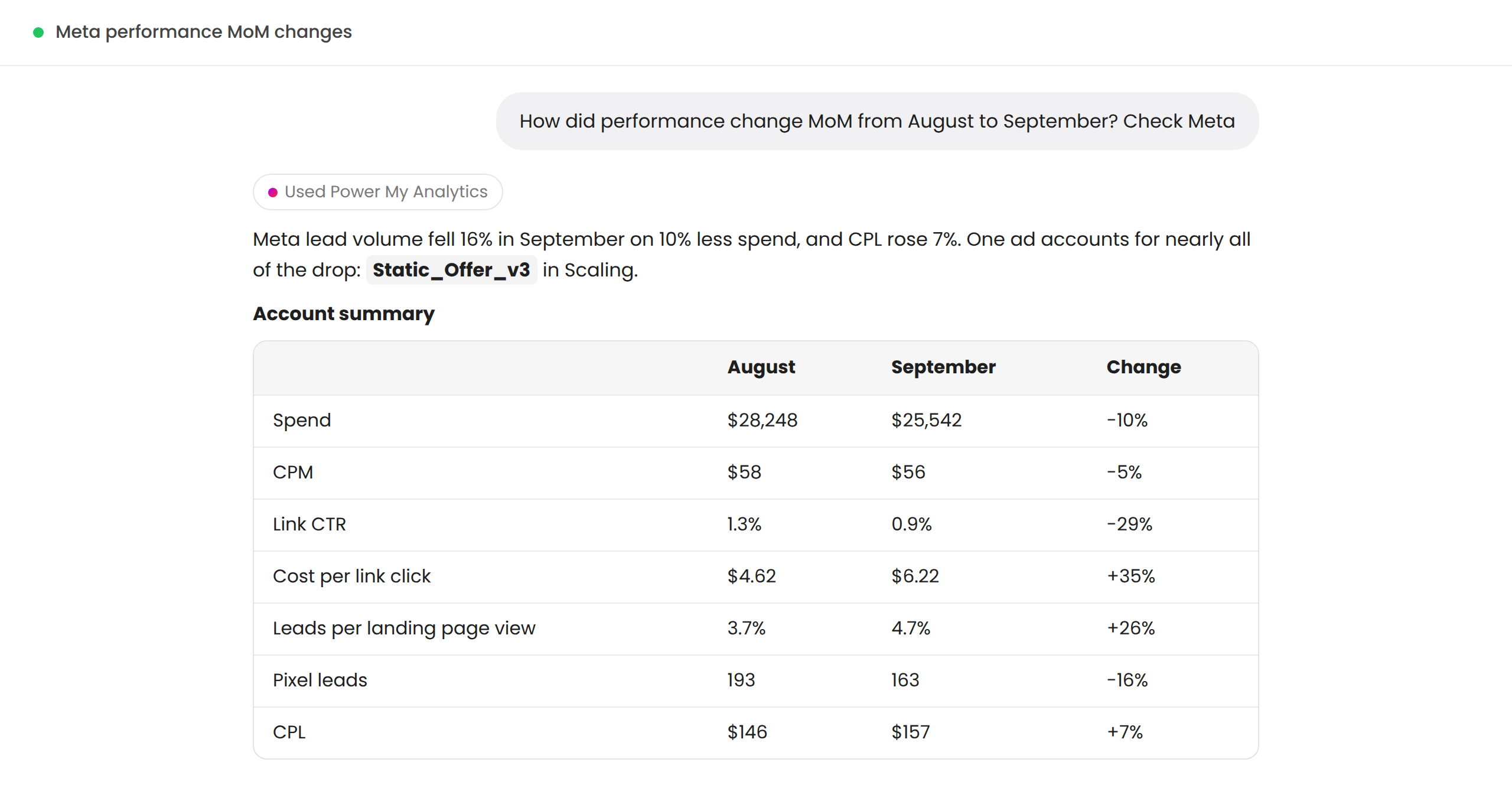
ChatGPT answering a marketing question with Power My Analytics data
How it works

Connect SQL to ChatGPT in three steps

1
Connect SQL
Sign in to SQL inside Power My Analytics. Your history backfills on its own.
2
Turn on MCP access
One toggle in Settings. It's already on your plan, whichever plan you're on.
3
Add it to ChatGPT and ask
Add Power My Analytics as a connector in ChatGPT, sign in, and ask your first SQL question.
Read the full setup guide →How the MCP server works →
Key features

Everything included with SQL

Easy setup
Use your free trial to connect SQL in a few clicks.
AI insights
Quickly generate insights for SQL in ChatGPT.
All the metrics & dimensions you need
Every SQL metric and dimension Power My Analytics collects is available to ChatGPT.
Data warehousing
Import historic SQL data for immediate insights, and store all your marketing metrics in one warehouse.
SOC 2 Type II & ISO 27001 certified
Certified and compliant with data protection and privacy frameworks.
One connection, every source
The same ChatGPT connection reaches all 80+ connectors on your account.

Customer-focused differentiators

Compare
Power My Analytics
Competitors
Connect your data to ChatGPT
✓ Included on every plan. Covers 95%+ of customers' needs at no extra cost
Limited usage credits
Data warehousing
✓ Included
Enterprise only
Free onboarding
✓ Included
Enterprise only
Starting price
✓ $41.63/month, billed yearly
$49.00+/month

SQL + ChatGPT FAQ

Can ChatGPT read my SQL data?

Yes. Once SQL is connected to Power My Analytics and the connector is added in ChatGPT, it can query your SQL data directly and answer from your real numbers.

Which SQL metrics are available?

Everything in the SQL field list is available to ChatGPT. See the link under Key Features.

Can I combine SQL with my other marketing data?

Yes. The same connection reaches every source on your account, so ChatGPT can compare SQL with Google Ads, Meta, GA4 and more in one answer.

Is the ChatGPT connection an extra cost?

No. Connecting your data to ChatGPT is included on every plan and covers over 95% of customers' needs at no extra cost.

Can ChatGPT make changes in SQL?

Coming soon. Write actions are in final testing. Today the connection reads your data, so ChatGPT can analyze performance and recommend changes for you to make.

Connect SQL to ChatGPT today

14-day free trial. No credit card required. Every connector and MCP access included.

View pricing

Preferred by data-driven businesses

Humane Society
Wyndham
Bissell
Autonation
Oneill